RainbowDuino here it is! (and how to program it)
2009 June 25

rainbowduino2
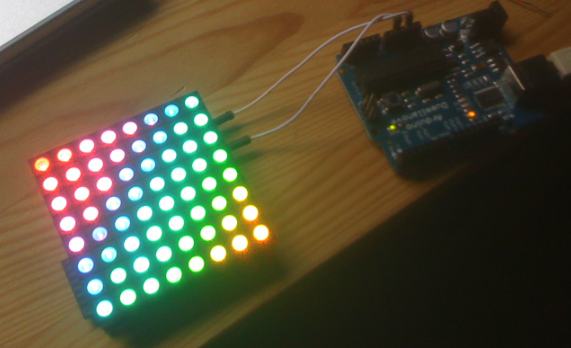
Yay – I finally got my RainbowDuino. Unluckily I did sth wrong with the external power connection (JST 2 pin jack) and smashed a capacitor. Maybe the polarity was wrong or it couldn’t stand the 12 volts? But luckily no damage to the main system so it still works using the terminal connector (right through the 5volts of the Arduino). *phew*

The first real basic problem I ran into was how to program the Rainbowduino as there’s no USB connector and I don’t have an UART interface.
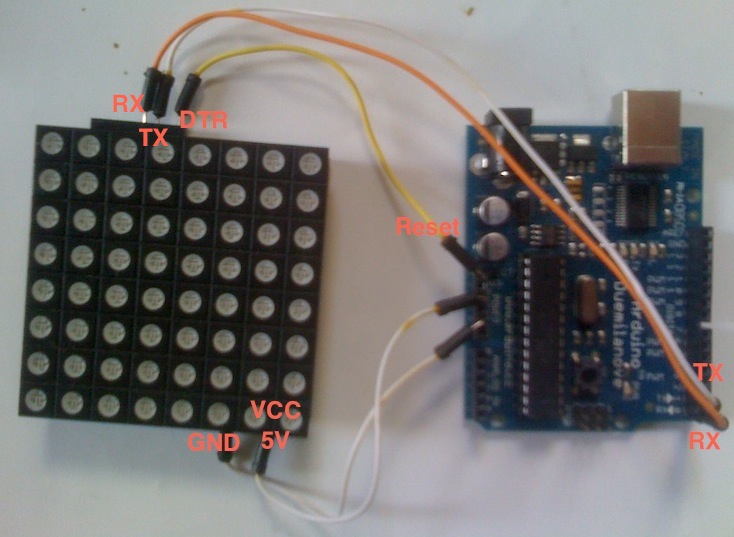
But well, nothing simpler than that: Just connect your Arduino’s Tx,Rx,GND,Reset and Vcc ports with those of the Rainbowduino, choose the right controller type in your IDE and program it as usual – works perfect for me!

Check out my Rainbowduino Editor mtXcontrol here – it’s an easy way to draw shapes on your rainbowduino!

Btw. DTR on Rainbowduino is Reset on Arduino

UPDATE:
Sorry I forgot to mention, this trick does NOT work if your host arduino is a ATmega168 – you need an ATmega328 to pass serial communication through. Before that, make sure you upload this blank sketch to your host Arduino first:

/* blank sketch to upload on Arduino */
void setup()
{
}

void loop()
{
}

And, as multiple times requested, a picture of my complete setup:
arduino_rainbowduino

Make sure you’ve selected the switch right. It has to point to the same side as the green Terminal connectors are. If you power rainbowduino through the white JST jack, flip it!

57 Responses leave one →
  1. 2010 January 29

    thanks TOBI Iam shure i have the wright mtx the part idont understand is
    e. Using the Arduino IDE, load the firmware.pde sketch and then transfer it.

  2. 2010 February 1

    FINALY GOT SOME LIFE OUT OF THE RAINBODU STILL CANT USE THE MTX CONT.BUT THE LINK AND THE RAINROW WORKS THE ONLY THING IT RUNS IS #include “Rainbowduino.h”
    #include “RCodes.h” //API Cod DO YOU HAVE ENY SUGESTION ON WHAT I DONT UNDERST OR IAM DOING WRONG. THANKS AND GOD BLESS

  3. 2010 May 13

    Hi!!

    I’ve tried but it does not work for me… what I do is the following:
    1- Connect Arduino (328) with Rainbowduino as your connections (tx-tx, rx-rx)
    2- Upload the blank sketch to the 328 arduino
    3- Change the Board to “Arduino Diecimila, Duemilanove or nano Atmega/168″ and upload the firmware.pde
    At this point, the upload is not succesful and I get the error: “avrdude: stk500_recv(): programmer is not responding”

    Any idea?

    Thanks in advance,
    xphere.

  4. 2010 May 17

    now it works! and error from my side… sorry!

  5. 2010 June 28

    Hi sweet looking app. I have a newer Rainbowduino with an Atmel 328

    The blank sketch loads fine on my Arduino 328 but when trying to upload to the Rainbowduino (after following the wiring in the blog pic), I get this

    tried both setting 128 and 328 in the arduino IDE, any ideas?

    avrdude: stk500_paged_write(): (a) protocol error, expect=0×14, resp=0×64
    avrdude: failed to write flash memory, rc=-4
    avrdude: stk500_disable(): protocol error, expect=0×14, resp=0×51

Trackbacks & Pingbacks

  1. Rainbowduino… a virus in my Arduino!
  2. neophob.com » Rainbowduino fun – aka neorainbowduino

Leave a Reply

Note: You can use basic XHTML in your comments. Your email address will never be published.

Subscribe to this comment feed via RSS